
 Travel AI Rescue — emergency help while you travel
Not just an AI that chats. Theft, illness, SIM trouble — send a photo or one line and it produces a draft or local-language card you can use on the spot (a police-report draft, a local-language card, an insurance contact summary…). It already knows your destination and plan, so it reduces repeat explanations and only confirms what's needed for your safety.
🤖 What only an AI can do
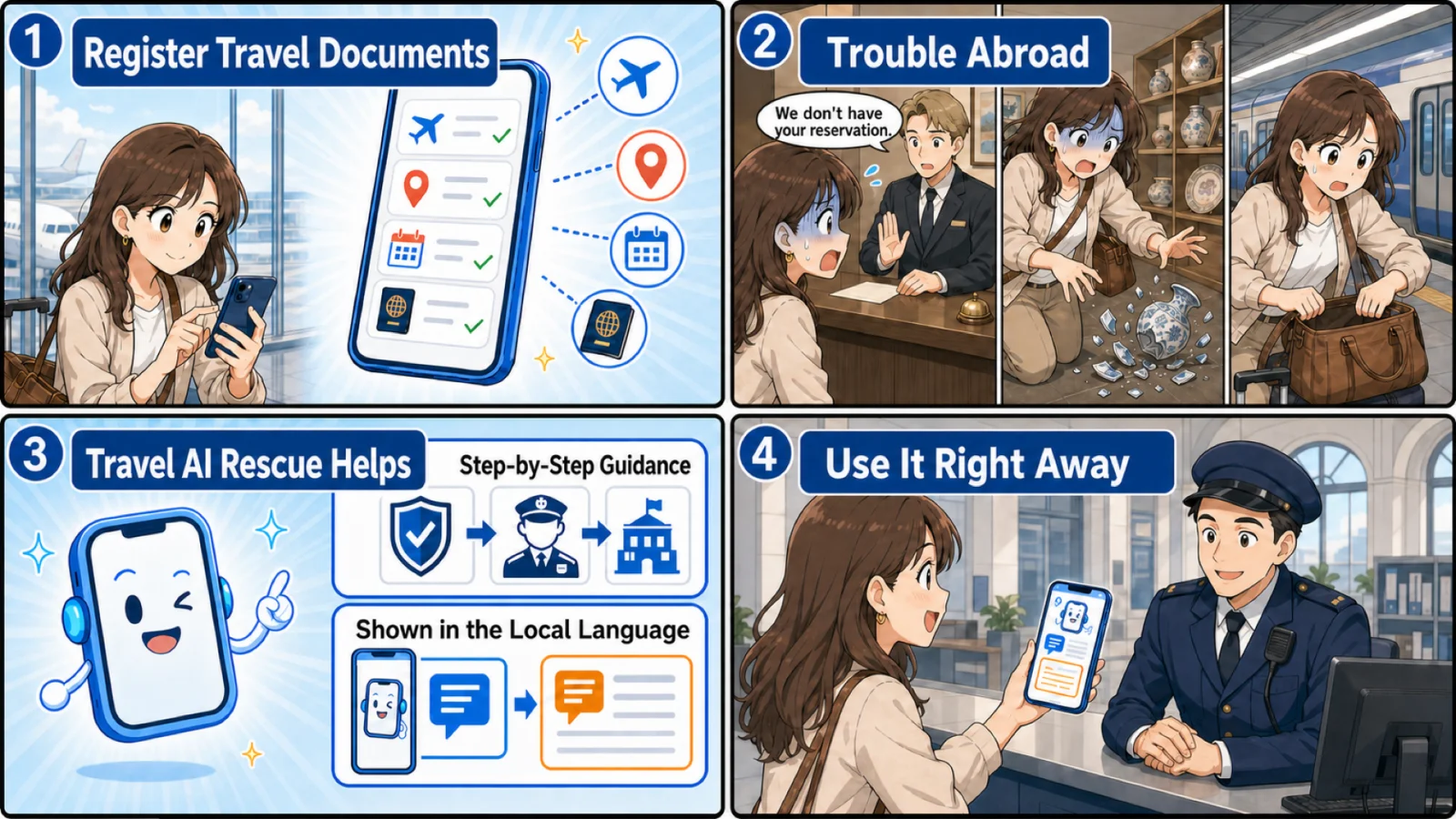
“My bag was stolen on the subway.” No forms, no explaining your situation over and over.
A police-report draft, a local-language card, an insurance summary — generated in one tap. Print or email it.
Answers using your destination, plan and saved bookings; emergency numbers and steps matched to your country.
🛟 Real situations — here’s how it helps
You can’t research “what if” once it’s happening. Here’s how Travel AI Rescue walks with you, through each next step, across six common situations.
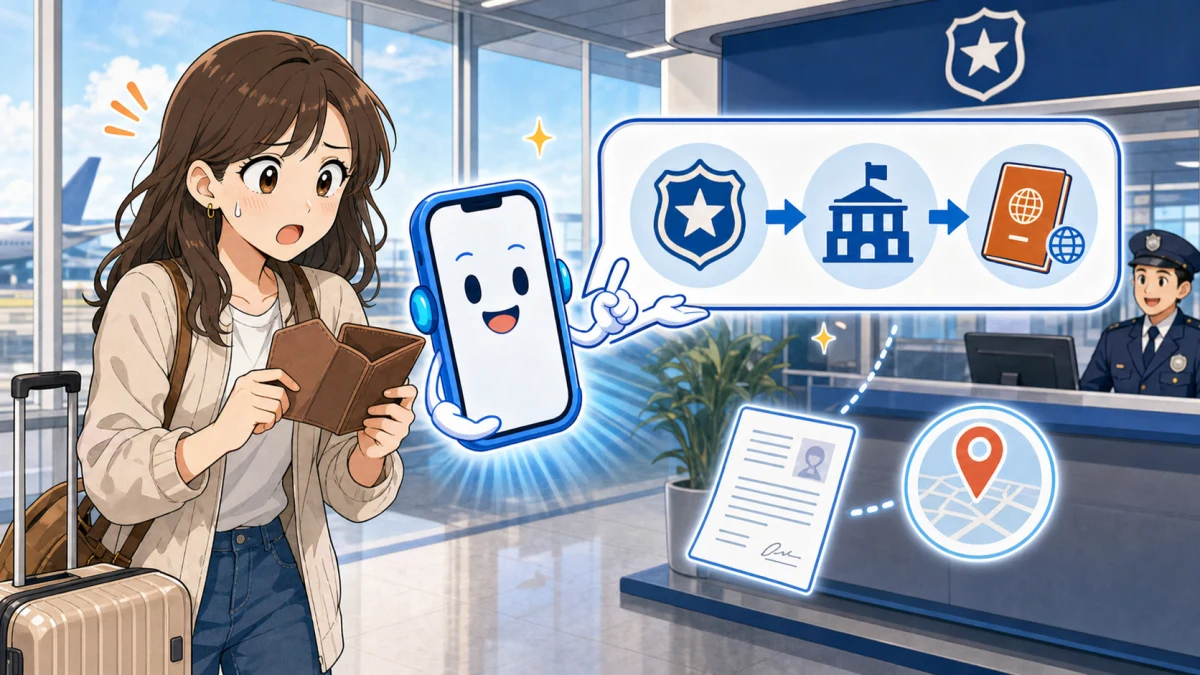
- First, ask Travel AI Rescue: it lays out the right order for your country — ① police → ② embassy → ③ getting home.
- Police: Travel AI Rescue drafts a lost-property report with a local-language translation, plus the nearest station.
- Embassy: Travel AI Rescue tells you the documents you need and the official consulate contact; your saved passport photo is on your device.
- Home: Travel AI Rescue guides you through an emergency travel document to get you back.
✨ The order, the paperwork — Travel AI Rescue has it ready. You won’t be lost.
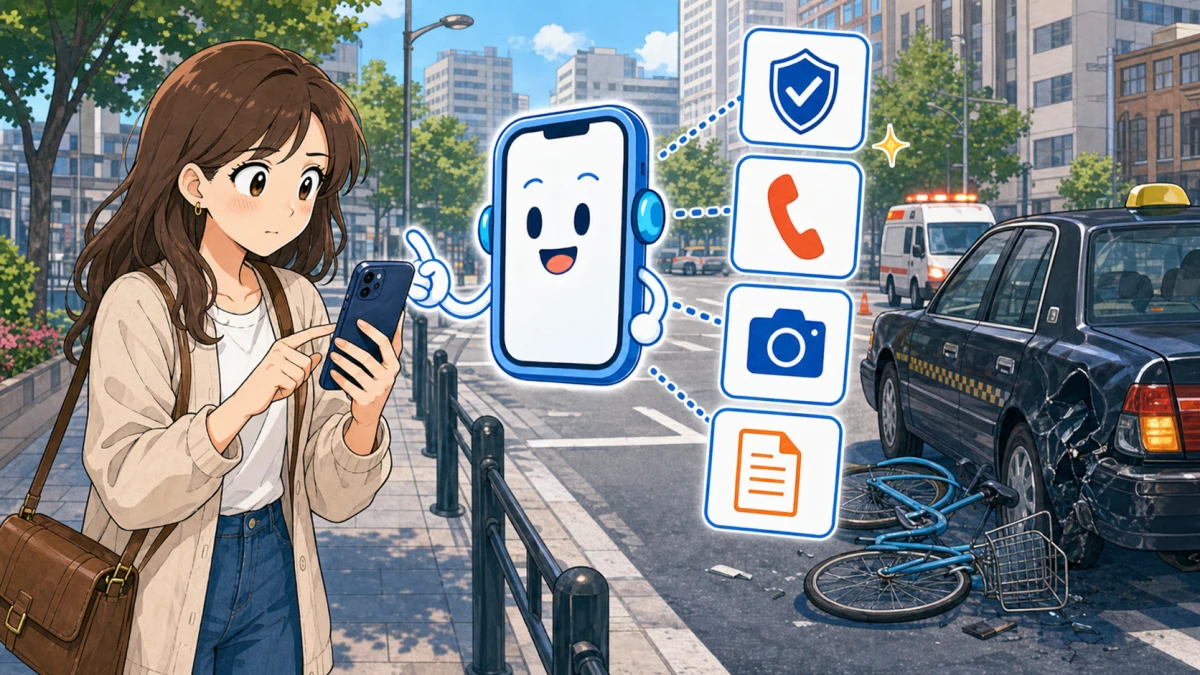
- Tell Travel AI Rescue what happened and it walks you through “get safe → call for help → record,” calmly.
- Emergency call: Travel AI Rescue sets up local police/ambulance so you dial in one tap (with the country code).
- Say it locally: Travel AI Rescue shows a card that reads “I’ve had an accident, please help.”
- Record: Travel AI Rescue saves it as an incident, with a summary for police and insurance.
✨ Even in a panic, Travel AI Rescue shows your next move.

- Freeze it: Travel AI Rescue dials your saved emergency-stop line in one tap (country code included) and opens the issuer’s freeze page.
- Police: Travel AI Rescue drafts a report in case of fraud.
- Fraud charges: Travel AI Rescue writes a chargeback dispute letter for anything you don’t recognize.
- No cash: Travel AI Rescue shows how to receive money via Western Union, an embassy emergency loan, or family transfer.
✨ No hunting for numbers, no drafting in a foreign language — Travel AI Rescue does it.

- Sort it out on the spot: Travel AI Rescue gives you local-language talking points while you show your saved booking.
- Know your rights: Travel AI Rescue lays out what the hotel owes on an overbooking (alternative room, covering the difference).
- Find a backup: Travel AI Rescue shows how to find nearby availability.
- Record: it keeps the exchange, and Travel AI Rescue turns it into a refund/compensation summary.
✨ Even if you can’t argue back, Travel AI Rescue prepares the right case.
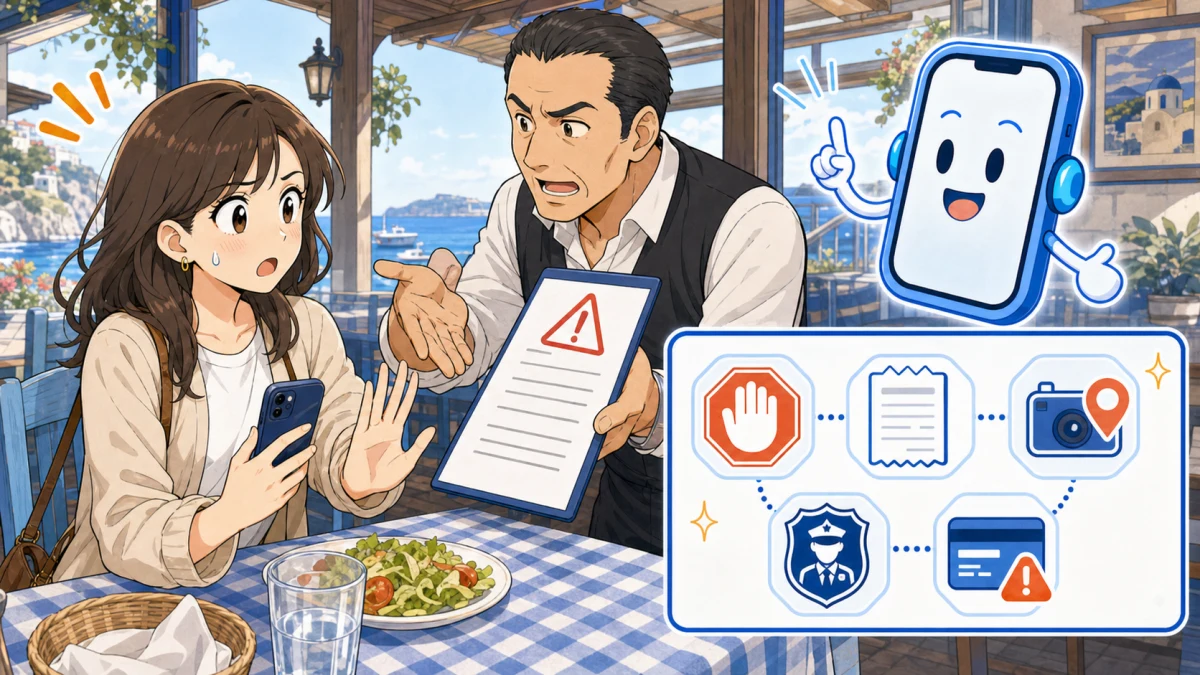
- Stay calm: Travel AI Rescue tells you what NOT to do — don’t pay on the spot, don’t sign.
- Local card: Travel AI Rescue shows “Is this the correct fare? Please give me a receipt.”
- Record: Travel AI Rescue logs the amount, place and details — your route and receipts help you dispute later.
- Report / refund: Travel AI Rescue gives tourist-police contacts with the country code, plus a chargeback letter if you paid by card.
✨ Don’t get swept along — with Travel AI Rescue, record the evidence and respond right.

- Get care: enter symptoms and Travel AI Rescue shows a show-and-go local-language card and nearby hospitals.
- Insurance: Travel AI Rescue calls your overseas assistance desk and explains cashless care and what they need.
- Record: Travel AI Rescue saves the diagnosis you received and your costs, with a summary for contacting your insurer.
- Medicine: Travel AI Rescue gives generic drug names and how to find a pharmacy.
✨ Even across a language barrier, Travel AI Rescue helps you organize care, insurance and records.
※ Each step reflects an actual feature. In emergencies, free emergency turns are added automatically so you’re less likely to run out. For medical, legal or immigration matters, always prioritize local police, ambulance services and your embassy.
🧾 What the AI creates for you
It doesn't just chat — you walk away with something usable (examples):
A statement you can file, with a local-language translation.
“My wallet was stolen. Where's the police station?” — just show it.
The damage and timeline, organized for contacting your insurer.
Dispute a charge you don't recognize.
Translate a menu, medicine or sign on the spot.
Add your bookings to your calendar (.ics) — part of the pre-trip support.
Screens and text are illustrative; the actual output is generated from your conversation.
🛡️ With vs. without Travel AI Rescue
| Situation | Without Rescue | With Rescue |
|---|---|---|
| Wallet / passport stolen | Language barrier — no idea where or what to report; paperwork from scratch. | Where to report + a local-language card + a police-report draft + insurance summary, on the spot. |
| Sudden illness or injury | How do I explain symptoms? Which hospital? What about insurance? | How to find care, how to say symptoms locally, your insurer's desk number. |
| SIM won't connect | No internet = can't look anything up. | Offline setup steps + SIM check (a pre-approved decision tree). |
| Getting ready to fly | Miss check-in, an expired passport, a missed visa. | 24-hour check-in, the 6-month passport rule, ESTA/visa reminders — ahead of time. |
| Late night, language barrier | No one to ask; anxious and alone. | A 24/7 automated AI (not a human service); emergency numbers dial in one tap with the country code. |
Why not just use a general-purpose chat AI?
We don't compete with general-purpose chat AI for everyday use. We're built to win specifically when you're stuck, in a hurry, or in an emergency.
| General-purpose chat AI | Travel AI Rescue |
|---|---|
| ❌ Can't open it with no signal | ✅ A SIM problem is exactly when you have no signal — offline setup steps and emergency cards still work |
| ❌ You have to explain your situation every time | ✅ Already knows your plan and destination from your order. No re-explaining |
| ❌ Wrong answers in an emergency can be dangerous | ✅ SIM check uses a pre-approved decision tree; emergency numbers, embassies, and clinics come from official sources — never invented |
| ❌ You paste your passport & card details into a chatbot — sent to their servers and kept in history | ✅ Your key info is saved with “Safety-setup” on your device only — plaintext is never sent to our server. Pull it up locally when you need it |
| ❌ No help before or after the trip | ✅ Pre-trip vault (valuables & bookings) through automatic post-incident document drafting, end to end |
This comparison describes actual product features (e.g. "works with no signal" refers to our offline pack, not general connectivity).
🆘 When things go wrong, here’s how it helps
It doesn’t just chat — it hands you a screen or document you can use right away. Finding numbers, translating, drafting paperwork: the AI does it for you.
Just talk, and a police-report draft with a local-language translation is ready, plus a summary to contact your insurer (please review before submitting).
One tap dials your saved card-stop line (country code included) and opens the issuer’s freeze page. No hunting for numbers.
Enter your symptoms and get a show-and-go local-language card, nearby hospitals, and a one-tap call to your insurer’s desk.
An offline check that works with no signal. Tick the steps and most issues clear on the spot.
Shows what to check and where to apply, opens the airline site, and prepares a factual draft you can send (whether compensation applies is the airline’s call).
※ Screens are illustrative. Actual content is generated from your conversation and saved details; calls use the numbers you saved, with the country code.
🔌 Works even with no connection (offline)
Chatting with the AI needs a connection — but the features you need most when your SIM won't connect are stored on your device and work offline.
- 📶 SIM decision tree — step-by-step recovery, even with no signal.
- 💾 Offline pack — save the emergency guides to your device.
- 🔐 Your Safety-setup data — passport / cards / contacts, pulled up on-device (no server).
- 🗣️ Emergency cards — show a local-language card like “My wallet was stolen” with zero bars.
- 📖 eSIM setup guides — how to install, activate and troubleshoot your eSIM, on-device even with no signal.
- 📖 SIM / Wi-Fi manual vault — any provider. Save your manual and its support contact, and open them even offline.
🛡️ Bundled with an eSIM, you also get the “doesn't connect → refund” guarantee on top of AI Rescue. Buying Travel AI Rescue on its own does not include the eSIM refund guarantee.
How it works — 3 simple steps
There's nothing new to learn. In an emergency you just talk or take a photo. The AI picks the right steps from a pre-approved playbook and even prepares your cards and documents.
🗺️ My Trip — your whole trip at a glance on the ground
Save your bookings before you go, and on the ground you always know “where am I, where next.” World clock, alarm and map links — thoughtful to the last detail.
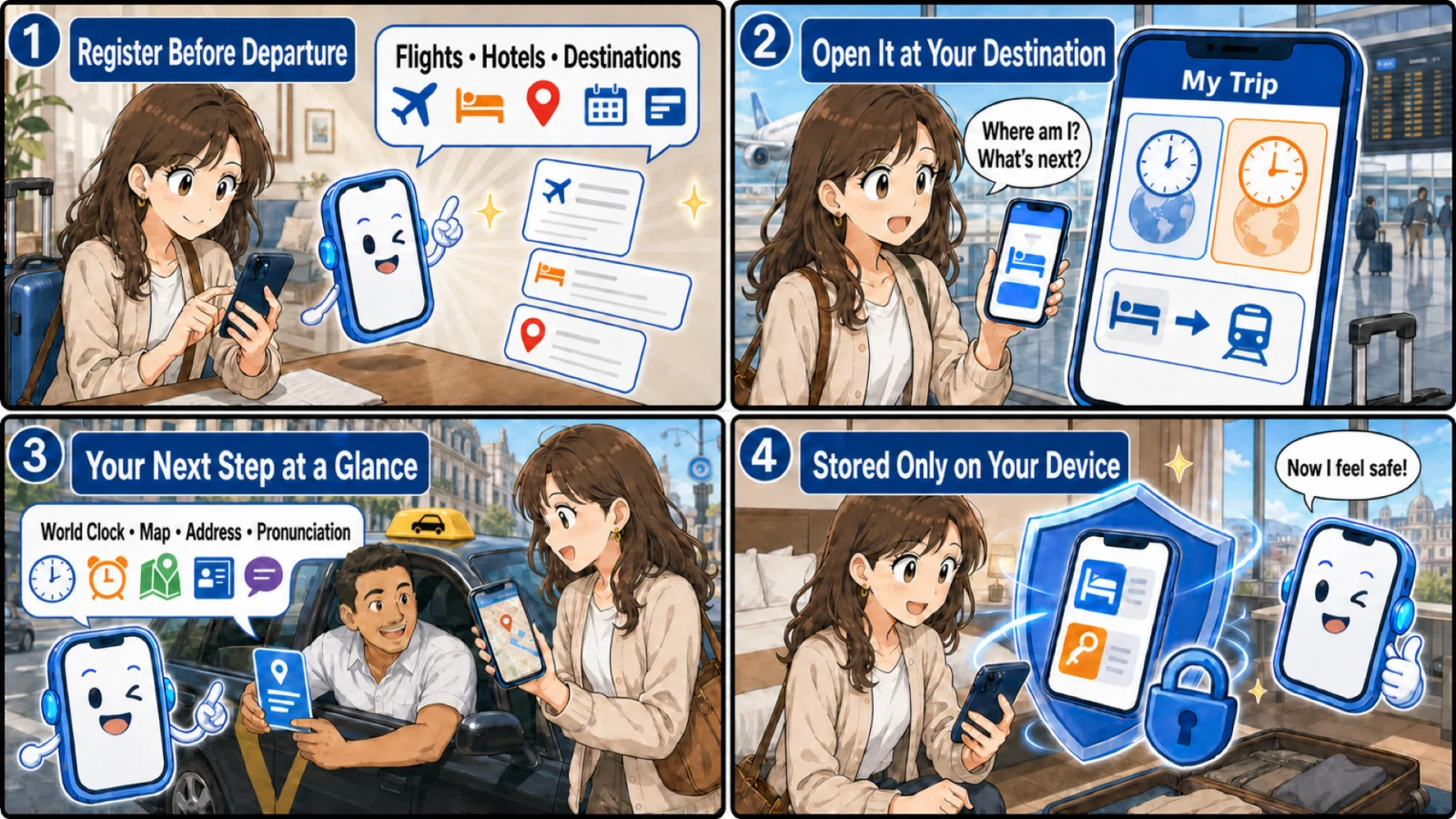
Add your flight (booking ref), hotel (ref/room) and destinations — a screenshot or number is fine.
My Trip shows your whole itinerary on one screen.
World clock, map links and pronunciations — move without hesitation.
Thoughtful, helpful details
※ Screens are illustrative; the actual content reflects what you saved.
🧰 Eight practical tools
Rescue comes with hands-on tools too. Most work offline, and anything sensitive stays on your device.
Flag danger signs in a suspicious URL/DM
Meds, batteries, vapes — what to check
Make a card to show at restaurants
The contacts to call and what to check
PIR, AirTag handoff, and record it
DCC choice & authorization-hold notes
Official safety/air/disaster/weather sources
Passport no.: TR1234567 …
Prepare passport details on your device and auto-generate a registration sheet
📋 Travel AI Rescue — full feature list
- Emergency SOS · 6 categories (SIM/illness/theft/transport/etiquette/talk)
- Chat: just describe what happened
- Auto-draft police report · insurance summary · chargeback letter
- Local-language & translation cards
- Passport-expiry check · ESTA/eTA/ETIAS
- Online check-in (.ics reminder)
- Packing checklist
- Itinerary · world clock · alarm · room-number note
- Store passport, cards, stay, emergency contacts on your device (encrypted, optional cloud backup)
- SIM self-check · offline pack · emergency cards · setup guide
- AI support meter · top-up
Pricing — a flat rate, whatever your trip length
Travel AI Rescue is included with every eSIM as standard. One flat price per trip, not a per-day rate.
| Bundled with an eSIM | On its own | Included |
|---|---|---|
| Included (part of the eSIM price) | $7.40 | 200 AI-support uses + 100 emergency reserve + 3 pre-trip prevention uses |
“◯ AI-support uses” = ◯ AI replies (1 use = 1 message), shared across chat, image diagnosis, translation and document drafting. In emergencies, SOS unlocks the 100-use emergency reserve automatically, so you’re less likely to run out when it matters.
🔓 Ran out? Top up anytime: +15 uses for $1.50 (from your account, in about a minute). The exact amount is always shown before you pay. Bundle pricing applies only when you add Travel AI Rescue at the same time as an eSIM — adding it later, or buying it alone, is at the standalone price above.
Even if your eSIM doesn't work and you get refunded, Travel AI Rescue keeps working until your trip ends. (Applies to guarantee refunds and automatic issuance-failure refunds. Access ends only on a full admin refund or a confirmed chargeback.)
Before you buy
- Travel AI Rescue is AI-automated support — not a 24-hour human service, and not a medical, legal, insurance or immigration service.
- New AI answers need a connection. Saved emergency cards, eSIM steps and registered info stay available offline.
- AI output is a draft — review it before use and follow the recipient's instructions. We do not auto-send to external agencies.
- Your usage period (start/end) is fixed at purchase and shown on the final checkout screen.
- Some features may be unavailable in certain countries or regions.
- When handling health, accident or crime information, we show where it's sent, why, and how long it's kept, and ask for your consent. It is not used to train general AI or for ads.
- In a serious emergency, contact local police, ambulance services, medical institutions or your embassy first.
See the full terms: Travel AI Rescue Terms · Terms of Service · Privacy Policy · AI Safety Policy · Cookies · Sub-processors · Legal disclosure · Cancellation & refund
Start by choosing your eSIM
Travel AI Rescue comes bundled automatically with every eSIM purchase.
Start with your Japan eSIM →Travel AI Rescue is AI-automated support for travel emergencies. It is not a substitute for the decisions or actions of police, ambulance, medical institutions, embassies or insurers (it is not a 24-hour human service). New AI answers need a connection; saved emergency cards, eSIM steps and registered info stay available offline. In a life-threatening emergency, contact local police, ambulance or medical services first. AI output is a draft — review it before use and follow the recipient's instructions. Travel AI Rescue is not travel insurance and does not provide financial compensation for medical costs, theft or other losses — it helps you prepare a summary for contacting your insurer.